Lensavi

Best Ergonomic Wireless Mice 2026: Vertical & Trackball Models Compared

6 models compared · Updated 4 Apr 2026

Specs Comparison
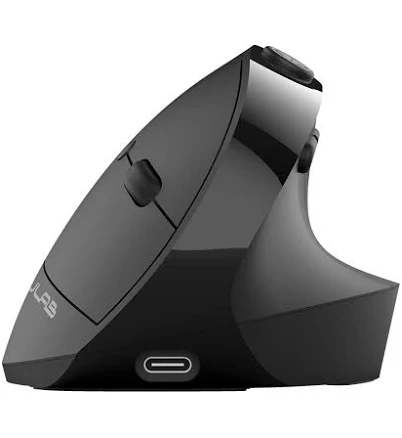
JLab JBuds Ergonomic Wireless Vertical Mouse
JLab JBuds Ergonomic Wireless Vertical MouseJLab$31.99
overall score
68
price
31.99
connectionWireless (USB dongle)
designVertical
dpi
battery
buttons
compatibility
sizes
tilt
View Verdict ↓
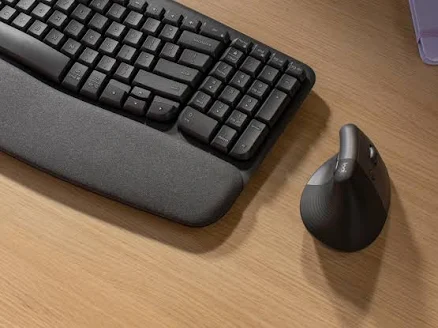
Logitech Lift Vertical Ergonomic Mouse
Best Value
Target$59.99
overall score
82
price
59.99
connectionLogi Bolt USB / Bluetooth
designVertical
dpi400–4000 DPI
battery24 months (AA battery)
buttons6 buttons
compatibilityWindows, macOS, Linux, ChromeOS
sizesSmall/Medium, Large
tilt
View Verdict ↓
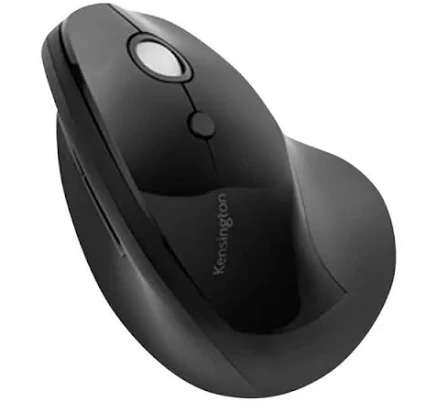
Kensington Pro Fit Ergo Vertical Wireless Mouse
Kensington Pro Fit Ergo Vertical Wireless MouseLenovo$34.99
overall score
72
price
34.99
connectionWireless 2.4GHz / Bluetooth
designVertical
dpi800 / 1200 / 1600 DPI
battery
buttons5 buttons
compatibilityWindows, macOS, Android
sizes
tilt
View Verdict ↓
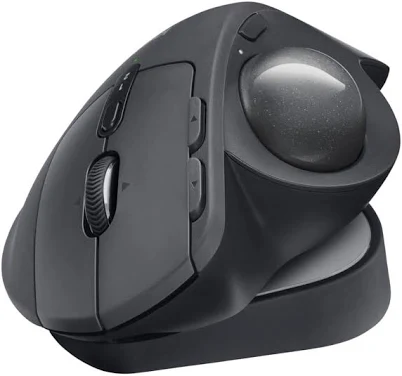
Logitech MX Ergo S Plus Wireless Trackball Mouse
Best Overall
Best Buy$99.99
overall score
91
price
99.99
connectionLogi Bolt USB / Bluetooth
designTrackball
dpi512–2048 DPI
batteryUp to 4 months (rechargeable)
buttons8 buttons
compatibilityWindows, macOS
sizes
tilt0° or 20° adjustable
View Verdict ↓
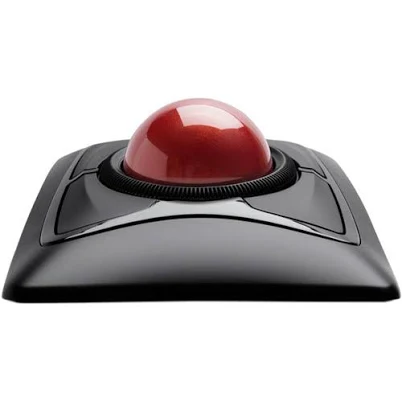
Kensington Expert Mouse Wireless Trackball
Best Premium
B&H Photo-Video-Audio$92.81
overall score
83
price
92.81
connectionWireless 2.4GHz / Bluetooth
designTrackball (large 55mm ball)
dpi400–1350 DPI
battery
buttons4 buttons + scroll ring
compatibilityWindows, macOS
sizes
tilt
View Verdict ↓
Seenda MOU-301 Trackball Mouse Wireless Rechargeable Ergonomic Mouse Multi-Connection
Seenda MOU-301 Trackball Mouse Wireless Rechargeable Ergonomic Mouse Multi-Connectionnewegg.com$62.99
overall score
74
price
62.99
connection2.4GHz USB / Bluetooth 5.0 / USB-C wired
designTrackball
dpiNot fully specified
batteryRechargeable (USB-C)
buttons
compatibilityWindows, macOS, Android, iOS
sizes
tilt
View Verdict ↓

Product Verdicts

JLab JBuds Ergonomic Wireless Vertical Mouse

Pros

Most affordable vertical option
Ergonomic vertical posture reduces forearm rotation
Wireless freedom without premium cost

Cons

Limited published specs (DPI, battery life unconfirmed)
Build quality reflects entry-level price point
Less brand recognition in peripherals category
Verdict
Best for first-time ergonomic mouse buyers on a tight budget. The vertical design delivers wrist-relief fundamentals, but limited spec transparency is a trade-off.
JLab JBuds Ergonomic Wireless Vertical Mouse
View DealJLab · $31.99

Logitech Lift Vertical Ergonomic Mouse

Best Value

Pros

400–4000 DPI range suits varied precision needs
Dual connection: Logi Bolt and Bluetooth
Available in two sizes for different hand sizes

Cons

AA battery rather than rechargeable
No silent-click option on standard model
Mid-range price for a non-rechargeable device
Verdict
Best for everyday office users who want a trusted brand with broad OS support. The two-size availability and dual connectivity make it the most accessible vertical pick in this group.
Logitech Lift Vertical Ergonomic Mouse
View DealTarget · $59.99

Kensington Pro Fit Ergo Vertical Wireless Mouse

Pros

Dual wireless modes (2.4GHz + Bluetooth)
Three switchable DPI levels
Affordable with Kensington's established ergonomic pedigree

Cons

Battery life not publicly confirmed
Lower maximum DPI (1600) than Logitech Lift
Fewer buttons than premium alternatives
Verdict
Best for budget-aware users who still want dual-mode connectivity. The three-level DPI switching adds flexibility rarely found at this price point.
Kensington Pro Fit Ergo Vertical Wireless Mouse
View DealLenovo · $34.99

Logitech MX Ergo S Plus Wireless Trackball Mouse

Best Overall

Pros

Adjustable 0°/20° tilt hinge for personalized wrist angle
Rechargeable with up to 4-month battery life
8 programmable buttons with Logi Options+ software

Cons

Premium price point
DPI ceiling (2048) lower than some vertical mice
Heavier build may not suit all users
Verdict
Best for power users and professionals who want the most customizable ergonomic trackball available. The adjustable tilt hinge is a class-leading differentiator in this category.
Logitech MX Ergo S Plus Wireless Trackball Mouse
View DealBest Buy · $99.99

Kensington Expert Mouse Wireless Trackball

Best Premium

Pros

Large 55mm trackball for precise, low-effort cursor control
Unique scroll ring replaces traditional scroll wheel
Dual wireless connectivity

Cons

Only 4 buttons — fewer than competitors
Lower DPI range (max 1350) limits high-resolution display use
Battery life not confirmed
Verdict
Best for users with wrist or repetitive strain conditions who need maximum cursor control with minimal hand movement. The 55mm ball and scroll ring are unlike anything else in this roundup.
Kensington Expert Mouse Wireless Trackball
View DealB&H Photo-Video-Audio · $92.81

Seenda MOU-301 Trackball Mouse Wireless Rechargeable Ergonomic Mouse Multi-Connection

Pros

Three connection modes including USB-C wired
Rechargeable via USB-C
Broad compatibility including iOS and Android

Cons

DPI and button count not fully disclosed
Lesser-known brand with limited long-term reliability data
Mid-range price without premium spec transparency
Verdict
Best for multi-device users who switch frequently between desktop, tablet, and mobile. The triple-connection flexibility with USB-C charging is the standout feature at this price tier.
Seenda MOU-301 Trackball Mouse Wireless Rechargeable Ergonomic Mouse Multi-Connection
View Dealnewegg.com · $62.99

About This Comparison

This roundup compares six ergonomic wireless mice — three vertical and three trackball designs — for users seeking to reduce wrist strain during long desktop sessions. Whether you're a remote worker, creative professional, or daily power user, each model targets a different balance of comfort, precision, and budget.

Verdict: Our Best Overall pick is the Logitech MX Ergo S Plus Wireless Trackball Mouse.

Read Full Review →
Read full conclusion

Our Best Overall pick is the Logitech MX Ergo S Plus Wireless Trackball Mouse. Best for power users and professionals who want the most customizable ergonomic trackball available. The adjustable tilt hinge is a class-leading differentiator in this category. Our Best Value pick is the Logitech Lift Vertical Ergonomic Mouse. Best for everyday office users who want a trusted brand with broad OS support. The two-size availability and dual connectivity make it the most accessible vertical pick in this group. Our Best Premium pick is the Kensington Expert Mouse Wireless Trackball. Best for users with wrist or repetitive strain conditions who need maximum cursor control with minimal hand movement. The 55mm ball and scroll ring are unlike anything else in this roundup.

Related Comparisons

Related Articles

Not sure what to buy?

We've compared hundreds of products so you don't have to.

Browse Comparisons