Quick Answer
Logitech MX Ergo S Plus Wireless Trackball Mouse
Top pick — Best for power users and professionals who want the most customizable ergonomic trackball available.
See full comparison →Logitech Lift Vertical Ergonomic Mouse
Top pick — Best for everyday office users who want a trusted brand with broad OS support.
See full comparison →Kensington Expert Mouse Wireless Trackball
Top pick — Best for users with wrist or repetitive strain conditions who need maximum cursor control with minimal hand movement.
See full comparison →At a Glance
| Product | Score | Price | Key Specs |
|---|---|---|---|
| JLab JBuds Ergonomic Wireless Vertical Mouse | 68 | Budget | connection: Wireless (USB dongle)design: Verticaldpi: Not specified |
| Logitech Lift Vertical Ergonomic Mouse | 82 | Mid-range | connection: Logi Bolt USB / Bluetoothdesign: Verticaldpi: 400–4000 DPI |
| Kensington Pro Fit Ergo Vertical Wireless Mouse | 72 | Budget | connection: Wireless 2.4GHz / Bluetoothdesign: Verticaldpi: 800 / 1200 / 1600 DPI |
| Logitech MX Ergo S Plus Wireless Trackball Mouse | 91 | Mid-range | connection: Logi Bolt USB / Bluetoothdesign: Trackballdpi: 512–2048 DPI |
| Kensington Expert Mouse Wireless Trackball | 83 | Mid-range | connection: Wireless 2.4GHz / Bluetoothdesign: Trackball (large 55mm ball)dpi: 400–1350 DPI |
| Seenda MOU-301 Trackball Mouse Wireless Rechargeable Ergonomic Mouse Multi-Connection | 74 | Mid-range | connection: 2.4GHz USB / Bluetooth 5.0 / USB-C wireddesign: Trackballdpi: Not fully specified |
What to Look For
Grip Style Compatibility
Ergonomic mice are designed around palm, claw, or fingertip grips. Choosing the wrong grip style causes fatigue even in a well-designed mouse. Confirm your natural grip before selecting a form factor.
Vertical vs. Trackball Design
Vertical mice tilt the hand to a handshake position, reducing forearm rotation. Trackballs keep the hand stationary entirely, benefiting users with limited desk space. Each solves wrist strain differently — pick based on your primary complaint.
Wireless Connectivity Options
Most ergonomic wireless mice offer USB dongle, Bluetooth, or both. Dongles provide lower latency; Bluetooth saves a USB port and supports multi-device pairing. For office multi-monitor setups in 2026, dual-mode connectivity is increasingly standard.
Hand Size and Weight
A mouse that is too small forces finger gripping all day; too large strains the thumb and pinky. Mouse weight affects fatigue over long sessions — lighter models suit high-movement users, while heavier builds feel more stable for precision work.
Adjustable Tilt and DPI
Some ergonomic designs offer switchable tilt angles so users can progress gradually toward a more neutral wrist position. Adjustable DPI lets you slow the cursor for detail work without changing grip pressure, reducing micro-tension in the hand.
How We Chose
We evaluated wireless mouse ergonomic design options based on grip style compatibility, hand size fit, connectivity reliability, and long-term comfort for extended use. Priority was given to designs that reduce wrist deviation and forearm strain, whether through vertical angles, trackball mechanisms, or sculpted contours.
How We Chose
We evaluated wireless mouse ergonomic design options based on grip style compatibility, hand size fit, connectivity reliability, and long-term comfort for extended use. Priority was given to designs that reduce wrist deviation and forearm strain, whether through vertical angles, trackball mechanisms, or sculpted contours.
Key Trade-offs
Trackball designs eliminate desk movement but require a learning curve and periodic cleaning. Vertical mice reduce pronation strain but feel awkward during precision tasks. Standard ergonomic sculpts offer the gentlest adjustment period but deliver less dramatic posture correction. Battery life and wireless range also vary significantly across form factors.
Key Trade-offs
Trackball designs eliminate desk movement but require a learning curve and periodic cleaning. Vertical mice reduce pronation strain but feel awkward during precision tasks. Standard ergonomic sculpts offer the gentlest adjustment period but deliver less dramatic posture correction. Battery life and wireless range also vary significantly across form factors.
What Matters Most
The most important factor is matching the mouse shape to your grip style — palm, claw, or fingertip. Beyond shape, consider whether you need multi-device Bluetooth switching, adjustable DPI for mixed tasks, or a tilt angle you can customize. Buyers who spend more than four hours daily at a desk should prioritize wrist angle reduction above all other features.
What Matters Most
The most important factor is matching the mouse shape to your grip style — palm, claw, or fingertip. Beyond shape, consider whether you need multi-device Bluetooth switching, adjustable DPI for mixed tasks, or a tilt angle you can customize. Buyers who spend more than four hours daily at a desk should prioritize wrist angle reduction above all other features.
Our Picks
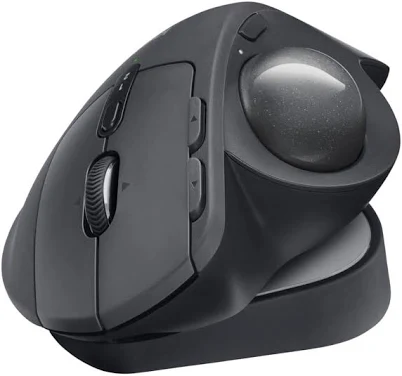
Logitech MX Ergo S Plus Wireless Trackball Mouse
Best OverallPros
Cons
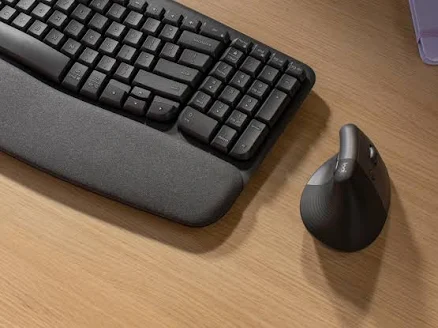
Logitech Lift Vertical Ergonomic Mouse
Best ValuePros
Cons
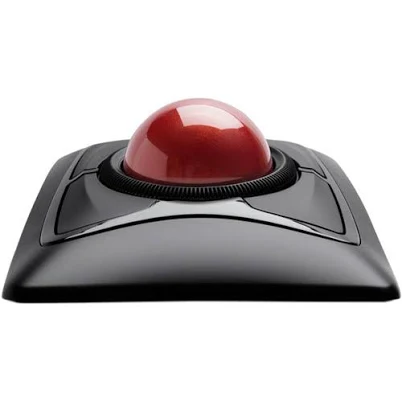
Kensington Expert Mouse Wireless Trackball
Best PremiumPros
Cons
Who Should Buy What
Logitech MX Ergo S Plus Wireless Trackball Mouse
Best OverallBest for power users and professionals who want the most customizable ergonomic trackball available.
View in Comparison →Logitech Lift Vertical Ergonomic Mouse
Best ValueBest for everyday office users who want a trusted brand with broad OS support.
View in Comparison →Kensington Expert Mouse Wireless Trackball
Best PremiumBest for users with wrist or repetitive strain conditions who need maximum cursor control with minimal hand movement.
View in Comparison →Who Should Buy What
Logitech MX Ergo S Plus Wireless Trackball Mouse
Best OverallBest for power users and professionals who want the most customizable ergonomic trackball available.
View in Comparison →Logitech Lift Vertical Ergonomic Mouse
Best ValueBest for everyday office users who want a trusted brand with broad OS support.
View in Comparison →Kensington Expert Mouse Wireless Trackball
Best PremiumBest for users with wrist or repetitive strain conditions who need maximum cursor control with minimal hand movement.
View in Comparison →