Quick Answer
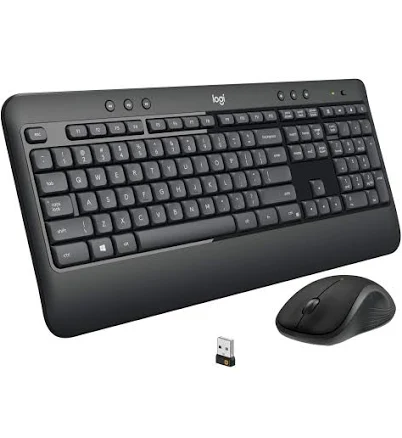
Logitech MK540 Wireless Keyboard Mouse Combo
Top pick — Best for Windows home office users who want a dependable, low-maintenance combo.
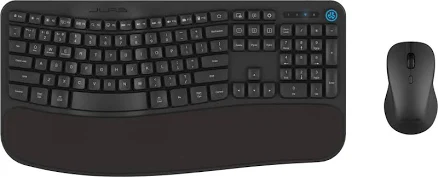
See full comparison →JLab Flow Wireless Ergonomic Keyboard and Mouse Set
Top pick — Best for users who prioritize ergonomics and multi-platform flexibility at a premium price point.
See full comparison →At a Glance
| Product | Score | Price | Key Specs |
|---|---|---|---|
| Logitech MK540 Wireless Keyboard Mouse Combo | 82 | Budget | connection: 2.4GHz USB receiverkeyboard type: Full-sizebattery life keyboard: 36 months |
| Onn. Wireless Keyboard and Compact Mouse | 58 | Budget | connection: 2.4GHz USB receiverkeyboard type: Full-sizebattery life keyboard: Not specified |
| Logitech MK345 Wireless Combo Keyboard/Mouse | 75 | Budget | connection: 2.4GHz USB receiverkeyboard type: Full-size with cushioned palm restbattery life keyboard: 24 months |
| JLab Flow Wireless Ergonomic Keyboard and Mouse Set | 80 | Budget | connection: 2.4GHz USB receiver or Bluetoothkeyboard type: Ergonomic split layoutbattery life keyboard: Not specified |
What to Look For
Connection Type Matters
Most wireless keyboard mouse combos use either a 2.4GHz USB dongle or Bluetooth. Dongles offer more reliable, low-latency connections, while Bluetooth frees up a USB port and pairs with more devices. Consider your setup before choosing.
Battery Life vs. Rechargeable
Some combos run on replaceable AA or AAA batteries, others have built-in rechargeable cells. Replaceable batteries mean no downtime, but rechargeables reduce long-term cost. Check rated battery life — anything under three months of daily use is a drawback.
Ergonomics and Comfort
If you type or click for hours daily, ergonomic design is critical. Look for a contoured mouse, cushioned palm rest, and a keyboard with a comfortable key travel. Ergonomic combos reduce fatigue but are typically larger and less portable.
Range and Interference
Standard wireless combos work reliably within 10 metres. In offices with many wireless devices, 2.4GHz signals can experience interference. If your workspace is crowded with wireless peripherals, prioritize combos with strong signal stability ratings.
Compatibility and Multi-Device Support
Verify the combo works with your operating system — Windows, macOS, ChromeOS, or Linux. Some higher-end combos let you switch between multiple paired devices instantly, which is valuable if you work across a desktop and laptop.
How We Chose
We evaluated wireless keyboard mouse combos based on connection reliability, build quality, ergonomic design, battery performance, and overall value. Combos were assessed for how well they serve both home office and professional desk setups in 2026, prioritizing options that balance comfort with practical everyday usability.
How We Chose
We evaluated wireless keyboard mouse combos based on connection reliability, build quality, ergonomic design, battery performance, and overall value. Combos were assessed for how well they serve both home office and professional desk setups in 2026, prioritizing options that balance comfort with practical everyday usability.
Key Trade-offs
The main tradeoff in this category is between ergonomic comfort and compact portability. Ergonomic combos deliver better long-term comfort but take up more desk space and cost more. Budget-friendly combos cut costs on key travel quality and mouse precision, which matters if you do detailed work. Decide whether comfort or price is your priority before buying.
Key Trade-offs
The main tradeoff in this category is between ergonomic comfort and compact portability. Ergonomic combos deliver better long-term comfort but take up more desk space and cost more. Budget-friendly combos cut costs on key travel quality and mouse precision, which matters if you do detailed work. Decide whether comfort or price is your priority before buying.
What Matters Most
For most buyers, connection stability and battery life are the deciding factors in a wireless keyboard mouse combo. Ergonomics become critical for anyone working more than four hours daily at a desk. Multi-device pairing is worth paying extra for if you regularly switch between computers. Avoid combos with very short battery ratings or no power-saving auto-sleep feature.
What Matters Most
For most buyers, connection stability and battery life are the deciding factors in a wireless keyboard mouse combo. Ergonomics become critical for anyone working more than four hours daily at a desk. Multi-device pairing is worth paying extra for if you regularly switch between computers. Avoid combos with very short battery ratings or no power-saving auto-sleep feature.
Our Picks
Logitech MK540 Wireless Keyboard Mouse Combo
Best OverallPros
Cons
JLab Flow Wireless Ergonomic Keyboard and Mouse Set
Best ValuePros
Cons
Who Should Buy What
Logitech MK540 Wireless Keyboard Mouse Combo
Best OverallBest for Windows home office users who want a dependable, low-maintenance combo.
View in Comparison →JLab Flow Wireless Ergonomic Keyboard and Mouse Set
Best ValueBest for users who prioritize ergonomics and multi-platform flexibility at a premium price point.
View in Comparison →Who Should Buy What
Logitech MK540 Wireless Keyboard Mouse Combo
Best OverallBest for Windows home office users who want a dependable, low-maintenance combo.
View in Comparison →JLab Flow Wireless Ergonomic Keyboard and Mouse Set
Best ValueBest for users who prioritize ergonomics and multi-platform flexibility at a premium price point.
View in Comparison →