Quick Answer
Microsoft Surface Pro 11 Copilot+
Top pick — Best for power users, creatives, and AI-forward professionals who demand the absolute best Windows 2-in-1 money can buy.
See full comparison →Samsung Galaxy Tab S11
Top pick — Best for Android loyalists who want a flagship-grade tablet with stylus and desktop mode capabilities.
See full comparison →Microsoft Surface Pro 12"
Top pick — Best for professionals who want a current-generation Windows 2-in-1 with a refined display at a sensible price.
See full comparison →At a Glance
| Product | Score | Price | Key Specs |
|---|---|---|---|
| Lenovo Idea Tab 11" 2.5K Tablet | 68 | Premium | display: 11" 2.5Kos: Androidform factor: Tablet |
| Samsung Galaxy Tab S10 Lite | 74 | Premium | display: 10.1"os: Android (One UI)form factor: Tablet |
| Lenovo IdeaTab Pro | 76 | Premium | display: 11.5" 2.8K AMOLEDos: Androidform factor: Tablet |
| Samsung Galaxy Tab S11 | 85 | Premium | display: 11" Dynamic AMOLED 2Xos: Android (One UI)form factor: Tablet |
| Samsung Galaxy Tab S10 FE+ | 80 | Premium | display: 12.4" LCDos: Android (One UI)form factor: Tablet |
| Microsoft Surface 3 Bundle with Windows 10 | 55 | Premium | display: 10.8" PixelSenseos: Windows 10form factor: 2-in-1 Tablet |
| Microsoft Surface Pro | 72 | Premium | display: 13" PixelSenseos: Windows 11form factor: 2-in-1 Tablet |
| Microsoft Surface Pro 12" | 83 | Premium | display: 12" PixelSense Flowos: Windows 11form factor: 2-in-1 Tablet |
| Microsoft Surface Pro 11 Copilot+ | 92 | Premium | display: 13" PixelSense Flow OLEDos: Windows 11 Copilot+form factor: 2-in-1 Tablet |
| Microsoft Surface Book 2 (2-in-1 Laptop & Tablet) | 63 | Premium | display: 13.5" PixelSenseos: Windowsform factor: 2-in-1 Laptop/Tablet |
What to Look For
Pen Latency & Pressure Sensitivity
Low latency and high pressure sensitivity are the two most important specs for a tablet with stylus pen support. Anything above 10ms latency feels noticeably laggy for handwriting. Aim for 4,096 pressure levels or more for natural shading and line variation.
Display Quality & Size
A high-resolution display with at least 120Hz refresh rate makes stylus strokes feel smoother and more responsive. Larger screens give more canvas space for note-taking and illustration, but consider whether the tablet still fits your bag or desk setup.
Operating System & App Ecosystem
The OS determines which creative and productivity apps are available. Some platforms offer deeper stylus integration with native note-taking tools, while others rely on third-party apps. Check that your must-have apps support stylus input before committing.
Stylus Storage & Charging
A stylus that charges magnetically and snaps to the tablet is far more practical than one requiring a separate cable or case. Losing or forgetting to charge a detached stylus is a common frustration — built-in attachment solves this daily friction point.
Processing Power for Creative Workloads
Illustration, video annotation, and design apps demand real CPU and GPU headroom. If you plan to use your tablet with stylus pen support for professional creative work, prioritize a current-generation chip over a budget processor to avoid lag in demanding apps.
How We Chose
We evaluated tablets with stylus pen support based on pen latency, pressure sensitivity, display quality, and how naturally the stylus integrates with the operating system. Tablets that require third-party styluses with poor palm rejection or high latency were ranked lower regardless of other strengths.
How We Chose
We evaluated tablets with stylus pen support based on pen latency, pressure sensitivity, display quality, and how naturally the stylus integrates with the operating system. Tablets that require third-party styluses with poor palm rejection or high latency were ranked lower regardless of other strengths.
Key Trade-offs
The core tradeoff is between portability and productivity. Thinner, lighter tablets often sacrifice processing power or limit stylus compatibility to first-party pens only. Heavier, more capable devices offer better multitasking and broader stylus support but may feel less comfortable for extended handwriting or sketching sessions.
Key Trade-offs
The core tradeoff is between portability and productivity. Thinner, lighter tablets often sacrifice processing power or limit stylus compatibility to first-party pens only. Heavier, more capable devices offer better multitasking and broader stylus support but may feel less comfortable for extended handwriting or sketching sessions.
What Matters Most
Prioritize pen latency under 10ms and at least 4,096 levels of pressure sensitivity for a natural writing feel. Also confirm whether the stylus charges separately, attaches magnetically, or is included in the box — these details significantly affect day-to-day usability and long-term cost.
What Matters Most
Prioritize pen latency under 10ms and at least 4,096 levels of pressure sensitivity for a natural writing feel. Also confirm whether the stylus charges separately, attaches magnetically, or is included in the box — these details significantly affect day-to-day usability and long-term cost.
Our Picks
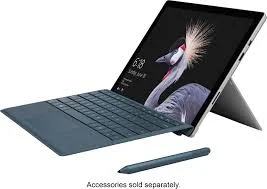
Microsoft Surface Pro 11 Copilot+
Best OverallPros
Cons
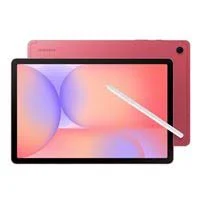
Samsung Galaxy Tab S11
Best ValuePros
Cons
Microsoft Surface Pro 12"
Best PremiumPros
Cons
Who Should Buy What
Microsoft Surface Pro 11 Copilot+
Best OverallBest for power users, creatives, and AI-forward professionals who demand the absolute best Windows 2-in-1 money can buy.
View in Comparison →Samsung Galaxy Tab S11
Best ValueBest for Android loyalists who want a flagship-grade tablet with stylus and desktop mode capabilities.
View in Comparison →Microsoft Surface Pro 12"
Best PremiumBest for professionals who want a current-generation Windows 2-in-1 with a refined display at a sensible price.
View in Comparison →Who Should Buy What
Microsoft Surface Pro 11 Copilot+
Best OverallBest for power users, creatives, and AI-forward professionals who demand the absolute best Windows 2-in-1 money can buy.
View in Comparison →Samsung Galaxy Tab S11
Best ValueBest for Android loyalists who want a flagship-grade tablet with stylus and desktop mode capabilities.
View in Comparison →Microsoft Surface Pro 12"
Best PremiumBest for professionals who want a current-generation Windows 2-in-1 with a refined display at a sensible price.
View in Comparison →