Quick Answer
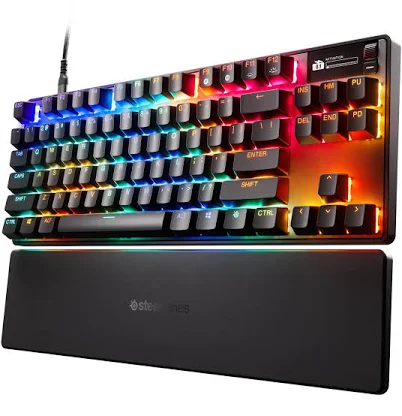
SteelSeries Apex Pro Gen 3 TKL Gaming Keyboard
Top pick — Best for serious competitive gamers who demand the most precise, configurable switch actuation available in 2026.
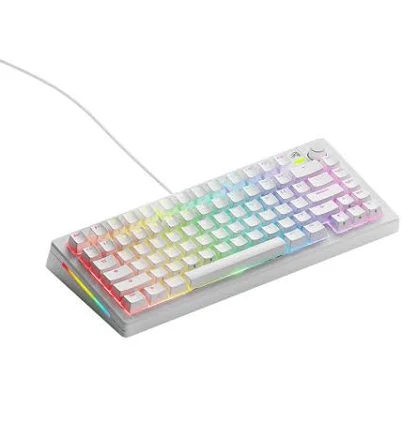
See full comparison →GMMK 3 Prebuilt Mechanical Keyboard
Top pick — Best for enthusiasts who want a custom-keyboard feel without building from scratch, at a mid-range price.
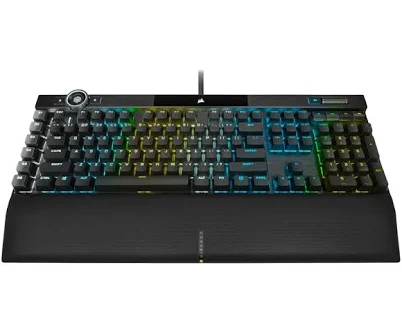
See full comparison →Corsair K100 RGB Gaming Keyboard
Top pick — Best for power users and streamers who want maximum macro control, premium build, and deep RGB customization.
See full comparison →At a Glance
| Product | Score | Price | Key Specs |
|---|---|---|---|
| HyperX Alloy Origins 65% Mechanical Gaming Keyboard | 78 | Mid-range | form factor: 65%switches: HyperX Red / Aqua / Blue (linear/tactile/clicky)backlight: RGB per-key |
| GMMK 3 Prebuilt Mechanical Keyboard | 83 | Mid-range | form factor: Full-size / TKL optionsswitches: Glorious Fox switches (pre-lubed)backlight: RGB per-key |
| SteelSeries Apex Pro Gen 3 TKL Gaming Keyboard | 91 | Premium | form factor: TKL (Tenkeyless)switches: OmniPoint 2.0 Adjustable Magnetic (0.1–4.0mm actuation)backlight: RGB per-key |
| Razer BlackWidow V4 X Mechanical Gaming Keyboard | 80 | Mid-range | form factor: Full-sizeswitches: Razer Green (clicky) / Yellow (linear)backlight: Razer Chroma RGB per-key |
| Corsair K100 RGB Gaming Keyboard | 88 | Premium | form factor: Full-size with iCUE Control Wheelswitches: Corsair OPX Optical-Mechanical / Cherry MX Speedbacklight: Corsair AXON RGB per-key (44-zone) |
| Alienware AW510K RGB Mechanical Gaming Keyboard | 77 | Premium | form factor: Full-sizeswitches: Cherry MX Red / Brown / Bluebacklight: AlienFX RGB per-key |
What to Look For
Switch Type Defines the Experience
Linear, tactile, and clicky switches each produce a fundamentally different feel and sound. Choose based on your primary use — gaming favors light linears, productivity favors tactile bumps. Hot-swap sockets let you change switches later without soldering.
RGB Lighting Quality Varies Widely
Per-key RGB backlighting is standard at this tier, but LED placement and diffusion affect glow quality. South-facing LEDs shine through legends more cleanly. Evaluate whether the software allows custom lighting zones and saves profiles onboard.
Form Factor and Layout
Full-size, TKL, 75%, and 65% layouts each trade desk footprint for key availability. Losing the numpad frees wrist space for mouse movement. Confirm the layout matches your workflow before prioritizing aesthetics or lighting.
Build Material and Typing Feel
Aluminum top plates and gasket-mounted PCBs reduce vibration and improve sound signature compared to basic tray-mount plastic builds. A denser, quieter thock is achievable even at mid-range price points in 2026.
Software and Onboard Memory
Reliable RGB customization software should be lightweight and not require a persistent background process. Onboard memory lets you store lighting and macro profiles directly on the keyboard, so settings travel with the board to any PC.
How We Chose
We evaluated mechanical keyboard rgb backlit options based on switch feel, lighting quality, build construction, and value. Priority was given to keyboards that balance daily typing comfort with gaming performance, since most buyers use one board for both. Form factor, software ecosystem, and per-key RGB customization depth were also weighted heavily.
How We Chose
We evaluated mechanical keyboard rgb backlit options based on switch feel, lighting quality, build construction, and value. Priority was given to keyboards that balance daily typing comfort with gaming performance, since most buyers use one board for both. Form factor, software ecosystem, and per-key RGB customization depth were also weighted heavily.
Key Trade-offs
The biggest tradeoff is between premium build quality and price. Full-aluminum frames with south-facing RGB LEDs deliver the best lighting bloom and durability, but cost significantly more than plastic-body alternatives. TKL and 75% layouts save desk space but sacrifice the numpad. Hot-swap switch sockets add long-term flexibility but can introduce wobble if build tolerances are loose.
Key Trade-offs
The biggest tradeoff is between premium build quality and price. Full-aluminum frames with south-facing RGB LEDs deliver the best lighting bloom and durability, but cost significantly more than plastic-body alternatives. TKL and 75% layouts save desk space but sacrifice the numpad. Hot-swap switch sockets add long-term flexibility but can introduce wobble if build tolerances are loose.
What Matters Most
Focus on switch type first — linear switches suit fast gaming, tactile switches suit typing, and clicky switches suit neither shared office nor late-night use. After switches, prioritize RGB uniformity and software stability. Many keyboards advertise vivid lighting but deliver uneven hotspots or buggy companion apps. A stable, lightweight software suite matters more than the number of preset effects.
What Matters Most
Focus on switch type first — linear switches suit fast gaming, tactile switches suit typing, and clicky switches suit neither shared office nor late-night use. After switches, prioritize RGB uniformity and software stability. Many keyboards advertise vivid lighting but deliver uneven hotspots or buggy companion apps. A stable, lightweight software suite matters more than the number of preset effects.
Our Picks
SteelSeries Apex Pro Gen 3 TKL Gaming Keyboard
Best OverallPros
Cons
GMMK 3 Prebuilt Mechanical Keyboard
Best ValuePros
Cons
Corsair K100 RGB Gaming Keyboard
Best PremiumPros
Cons
Who Should Buy What
SteelSeries Apex Pro Gen 3 TKL Gaming Keyboard
Best OverallBest for serious competitive gamers who demand the most precise, configurable switch actuation available in 2026.
View in Comparison →GMMK 3 Prebuilt Mechanical Keyboard
Best ValueBest for enthusiasts who want a custom-keyboard feel without building from scratch, at a mid-range price.
View in Comparison →Corsair K100 RGB Gaming Keyboard
Best PremiumBest for power users and streamers who want maximum macro control, premium build, and deep RGB customization.
View in Comparison →Who Should Buy What
SteelSeries Apex Pro Gen 3 TKL Gaming Keyboard
Best OverallBest for serious competitive gamers who demand the most precise, configurable switch actuation available in 2026.
View in Comparison →GMMK 3 Prebuilt Mechanical Keyboard
Best ValueBest for enthusiasts who want a custom-keyboard feel without building from scratch, at a mid-range price.
View in Comparison →Corsair K100 RGB Gaming Keyboard
Best PremiumBest for power users and streamers who want maximum macro control, premium build, and deep RGB customization.
View in Comparison →