Quick Answer
Kobo Libra Colour
Top pick — Best for power readers who want physical controls, colour, and note-taking in one device.
See full comparison →Kobo Clara Colour
Top pick — Best for readers of illustrated content, manga, or children's books who want colour without moving to a tablet.
See full comparison →BOOX Go 6 White Edition
Top pick — Best for readers who refuse to be locked into a single ecosystem and want one device for all their reading apps.
See full comparison →At a Glance
| Product | Score | Price | Key Specs |
|---|---|---|---|
| Barnes & Noble NOOK Glowlight 4 | 72 | Mid-range | display: 6-inch E Ink Cartafrontlight: Yesadjustable warm/coolwaterproofing: IPX7 |
| Kobo Clara BW | 78 | Mid-range | display: 6-inch E Ink Carta 1300frontlight: Yesadjustable warm/cool ComfortLight PROwaterproofing: IPX8 |
| BOOX Go 6 White Edition | 75 | Premium | display: 6-inch E Ink Carta 1200frontlight: Yeswarm/coolwaterproofing: None stated |
| Kobo Clara Colour | 82 | Mid-range | display: 6-inch E Ink Kaleido 3 colourfrontlight: Yesadjustable warm/cool ComfortLight PROwaterproofing: IPX8 |
| Kobo Libra Colour | 88 | Premium | display: 7-inch E Ink Kaleido 3 colourfrontlight: Yesadjustable warm/cool ComfortLight PROwaterproofing: IPX8 |
What to Look For
Front Light vs. Warm Light
Basic front lights emit cool white light, while premium models offer adjustable warm-to-cool tones. Warm light reduces blue light exposure, making evening reading more comfortable. Look for a wide colour temperature range if you read across different times of day.
Colour vs. Monochrome E-Ink
Monochrome e-ink delivers the sharpest text and longest battery life. Colour e-ink is ideal for illustrated books, comics, and magazines. If you read mostly prose, monochrome is the better value; colour screens justify the premium only for visual content.
Open Android vs. Closed Ecosystem
Closed ecosystems tie you to one store but offer simpler interfaces and longer battery life. Open Android devices let you install any reading app but require more management. Choose based on whether library flexibility or simplicity matters more to you.
Physical Page-Turn Buttons
Buttons allow one-handed reading without touching the screen, which many readers prefer. Not all e readers with backlight include them. If you read while commuting or in bed, buttons are a meaningful ergonomic advantage worth seeking out.
Waterproofing and Build Quality
An IPX8 waterproof rating means the device can survive submersion, useful for bath or poolside reading. Check the rating depth and duration. Devices without waterproofing are a risk if you read in humid environments or are prone to accidents.
How We Chose
We evaluated e readers with backlight based on screen quality, lighting system, battery life, and overall reading comfort. Devices were assessed across price tiers to reflect real buyer priorities in 2026, from casual readers to daily commuters and those who read in low-light conditions regularly.
How We Chose
We evaluated e readers with backlight based on screen quality, lighting system, battery life, and overall reading comfort. Devices were assessed across price tiers to reflect real buyer priorities in 2026, from casual readers to daily commuters and those who read in low-light conditions regularly.
Key Trade-offs
The main tradeoff is between screen size and portability. Larger displays suit long reading sessions but add weight. Colour e-ink screens offer a richer experience for comics and magazines but typically cost more and refresh slightly slower than monochrome panels. Android-based devices offer app flexibility but drain battery faster than closed ecosystems.
Key Trade-offs
The main tradeoff is between screen size and portability. Larger displays suit long reading sessions but add weight. Colour e-ink screens offer a richer experience for comics and magazines but typically cost more and refresh slightly slower than monochrome panels. Android-based devices offer app flexibility but drain battery faster than closed ecosystems.
What Matters Most
Prioritise the lighting system above all else. A warm-to-cool adjustable front light reduces eye strain significantly compared to a fixed cool light. Also check whether the device supports physical page-turn buttons, which many readers strongly prefer for one-handed use. Storage and waterproofing are secondary but worth confirming before purchase.
What Matters Most
Prioritise the lighting system above all else. A warm-to-cool adjustable front light reduces eye strain significantly compared to a fixed cool light. Also check whether the device supports physical page-turn buttons, which many readers strongly prefer for one-handed use. Storage and waterproofing are secondary but worth confirming before purchase.
Our Picks
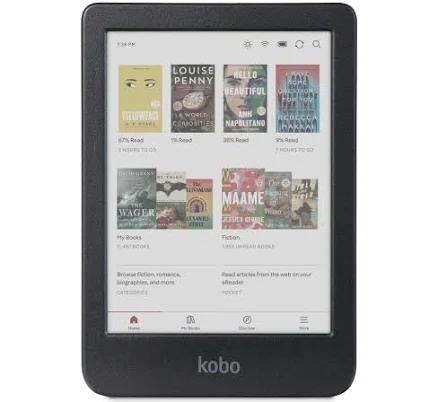
Kobo Libra Colour
Best OverallPros
Cons
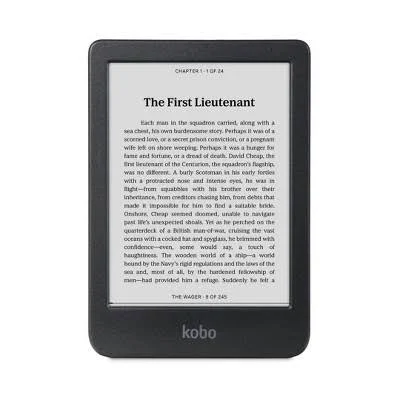
Kobo Clara Colour
Best ValuePros
Cons
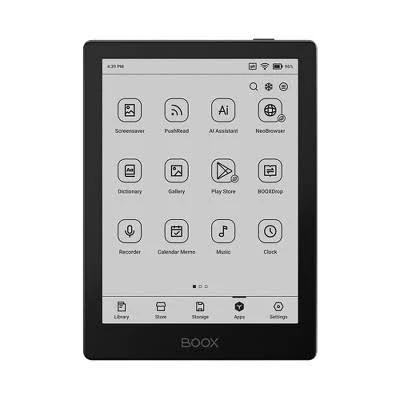
BOOX Go 6 White Edition
Best PremiumPros
Cons
Who Should Buy What
Kobo Libra Colour
Best OverallBest for power readers who want physical controls, colour, and note-taking in one device.
View in Comparison →Kobo Clara Colour
Best ValueBest for readers of illustrated content, manga, or children's books who want colour without moving to a tablet.
View in Comparison →BOOX Go 6 White Edition
Best PremiumBest for readers who refuse to be locked into a single ecosystem and want one device for all their reading apps.
View in Comparison →Who Should Buy What
Kobo Libra Colour
Best OverallBest for power readers who want physical controls, colour, and note-taking in one device.
View in Comparison →Kobo Clara Colour
Best ValueBest for readers of illustrated content, manga, or children's books who want colour without moving to a tablet.
View in Comparison →BOOX Go 6 White Edition
Best PremiumBest for readers who refuse to be locked into a single ecosystem and want one device for all their reading apps.
View in Comparison →