Quick Answer
Asus ROG Swift PG27UCDM 27" 4K UHD Gaming OLED Monitor
Top pick — Built for enthusiasts who refuse to compromise between resolution and speed.
See full comparison →ASUS ProArt Display PA27UCGE 27" 4K HDR 160Hz Monitor
Top pick — Designed for creative professionals who need color-accurate 4K OLED for video editing, photo work, or content production.
See full comparison →At a Glance
| Product | Score | Price | Key Specs |
|---|---|---|---|
| Asus ROG Swift PG27UCDM 27" 4K UHD Gaming OLED Monitor | 95 | High-end | resolution: 3840x2160 (4K UHD)panel: OLEDrefresh rate: 240Hz |
| ASUS ROG Strix XG27AQDMG 27" QHD OLED 240Hz Gaming Monitor | 87 | High-end | resolution: 2560x1440 (QHD)panel: OLEDrefresh rate: 240Hz |
| ROG Strix XG27UCS GEN2 | 74 | Premium | resolution: 3840x2160 (4K UHD)panel: IPS (Fast IPS)refresh rate: 160Hz |
| ASUS ProArt Display PA27UCGE 27" 4K HDR 160Hz Monitor | 90 | High-end | resolution: 3840x2160 (4K UHD)panel: OLEDrefresh rate: 160Hz |
What to Look For
OLED Panel Technology
OLED delivers per-pixel contrast and near-instant response times that LCD cannot match. At this category level, look for QD-OLED or WOLED variants, which improve peak brightness and color volume over earlier OLED generations. Burn-in mitigation features are now standard and should be confirmed before purchase.
Refresh Rate and Input Lag
High-end 4K OLED gaming monitors now reach refresh rates that make fast-paced titles genuinely smoother. Prioritize displays with a wide variable refresh range and confirmed low gray-to-gray response. A higher refresh ceiling only benefits you if your GPU can sustain matching frame rates at 4K.
HDR Implementation
True HDR performance requires both high peak brightness and deep black levels — OLED handles blacks natively. Check for VESA DisplayHDR True Black certification rather than standard HDR tiers. Displays at this level should also support HDR10 and ideally Dolby Vision for broad content compatibility.
Connectivity and USB-C
Premium monitors in this segment typically include DisplayPort 2.1, HDMI 2.1, and high-wattage USB-C. USB-C with sufficient power delivery lets you connect a laptop with a single cable. Confirm the USB-C port supports full resolution and refresh rate, not just charging.
Color Accuracy for Dual Use
Some buyers need a display that handles both gaming and creative work. Look for factory calibration reports, wide color gamut coverage, and hardware calibration support. Gaming-tuned panels may sacrifice calibration precision for speed, so clarify your primary use case before deciding.
How We Chose
Monitors in this category were evaluated on panel technology, refresh rate, HDR implementation, and connectivity. Buyers searching for options around the asus pg27ucdm tier are typically choosing between gaming-first OLED panels and color-accurate professional displays — both sharing similar specs but tuned for different priorities.
How We Chose
Monitors in this category were evaluated on panel technology, refresh rate, HDR implementation, and connectivity. Buyers searching for options around the asus pg27ucdm tier are typically choosing between gaming-first OLED panels and color-accurate professional displays — both sharing similar specs but tuned for different priorities.
Key Trade-offs
The core tradeoff at this level is between peak gaming performance and color-grading accuracy. Gaming-oriented OLED panels prioritize ultra-low input lag and high refresh rates, while professional-grade displays emphasize factory calibration and wider color volume. Neither is universally better — your workflow or game library should drive the decision.
Key Trade-offs
The core tradeoff at this level is between peak gaming performance and color-grading accuracy. Gaming-oriented OLED panels prioritize ultra-low input lag and high refresh rates, while professional-grade displays emphasize factory calibration and wider color volume. Neither is universally better — your workflow or game library should drive the decision.
What Matters Most
At the asus pg27ucdm price tier, burn-in protection, USB-C power delivery, and HDR brightness ceiling matter most. Verify that any display you consider includes automatic pixel-refresh cycles, supports your GPU's variable refresh range, and delivers enough USB-C wattage to charge a laptop simultaneously.
What Matters Most
At the asus pg27ucdm price tier, burn-in protection, USB-C power delivery, and HDR brightness ceiling matter most. Verify that any display you consider includes automatic pixel-refresh cycles, supports your GPU's variable refresh range, and delivers enough USB-C wattage to charge a laptop simultaneously.
Our Picks
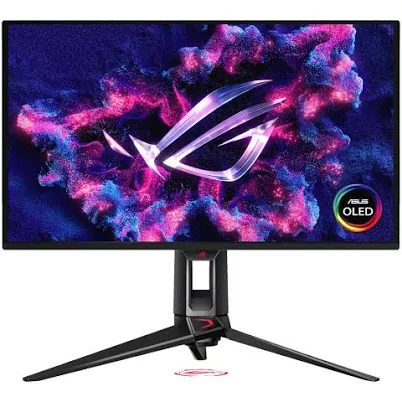
Asus ROG Swift PG27UCDM 27" 4K UHD Gaming OLED Monitor
Best OverallPros
Cons
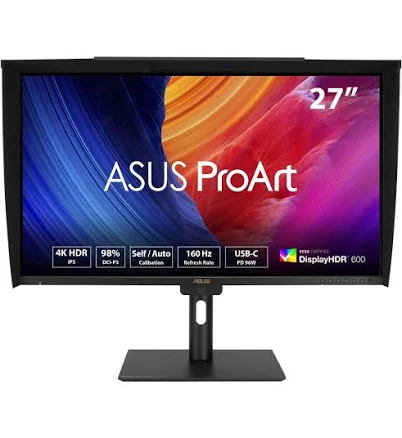
ASUS ProArt Display PA27UCGE 27" 4K HDR 160Hz Monitor
Best ValuePros
Cons
Who Should Buy What
Asus ROG Swift PG27UCDM 27" 4K UHD Gaming OLED Monitor
Best OverallBuilt for enthusiasts who refuse to compromise between resolution and speed.
View in Comparison →ASUS ProArt Display PA27UCGE 27" 4K HDR 160Hz Monitor
Best ValueDesigned for creative professionals who need color-accurate 4K OLED for video editing, photo work, or content production.
View in Comparison →Who Should Buy What
Asus ROG Swift PG27UCDM 27" 4K UHD Gaming OLED Monitor
Best OverallBuilt for enthusiasts who refuse to compromise between resolution and speed.
View in Comparison →ASUS ProArt Display PA27UCGE 27" 4K HDR 160Hz Monitor
Best ValueDesigned for creative professionals who need color-accurate 4K OLED for video editing, photo work, or content production.
View in Comparison →